How to replace an Excel city plan with a modern intranet in 3 weeks?
May 20, 2026
5 minutes
Readings
Trnava is another city that certainly isn't afraid of technological innovation. When the city approached us with the request that they needed a better system for managing investment projects, they had one main condition:It needs to be fast and functional. Let's be honest - replacing the established Excel isn't a small or easy task, but when the desire to change things for the better is combined with a clear vision, wonders can happen.
And so, a custom city intranet was created. Deployed in a record 2.5 weeks. Yes, you read that right – less than three weeks.
Imagine managing dozens of municipal investment projects, numerous responsible parties, deadlines, documentation, approvals... and it's all in Excel. However, with increasing complexity came the need for a system that would be clear, secure, and usable for all city employees.
Analysis and Workshops
Cooperation with the city of Trnava began in December. We started with a series of three intensive workshops spread over three weeks – and yes, we managed to fit them in between Christmas cookies and mulled wine. Thanks to the quick and efficient cooperation and the positively minded team, we were able to get a clear picture of the city's needs very quickly.
Two and a half weeks that were worth it
The express phase of solution customization followed – in 2.5 weeks, we modified and deployed the city intranet exactly according to individual requirements. After deployment, a one-month testing phase took place where the final details were fine-tuned. Speed did not mean compromises in quality – on the contrary, thanks to clearly defined goals and great cooperation, everything went smoothly.
What is Trnava using today?
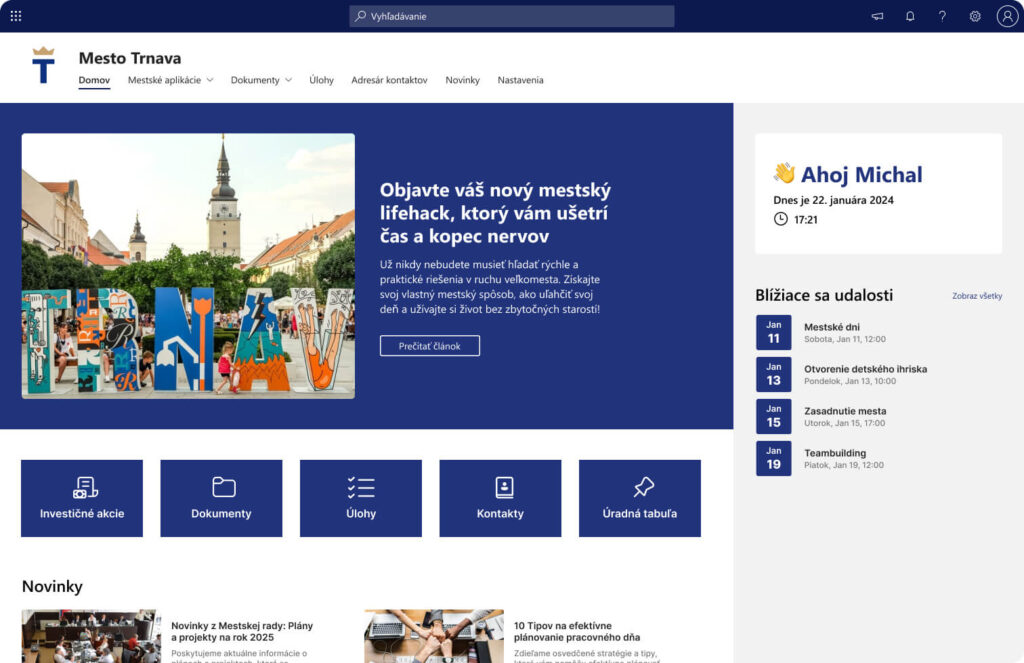
The result is a functional and clear intranet that significantly simplifies the daily operations of the city:
Central Hub Homepage– quick access to all important information and modules
Management Dashboardfor city management – tailor-made reports on investment status, budgets, or tasks
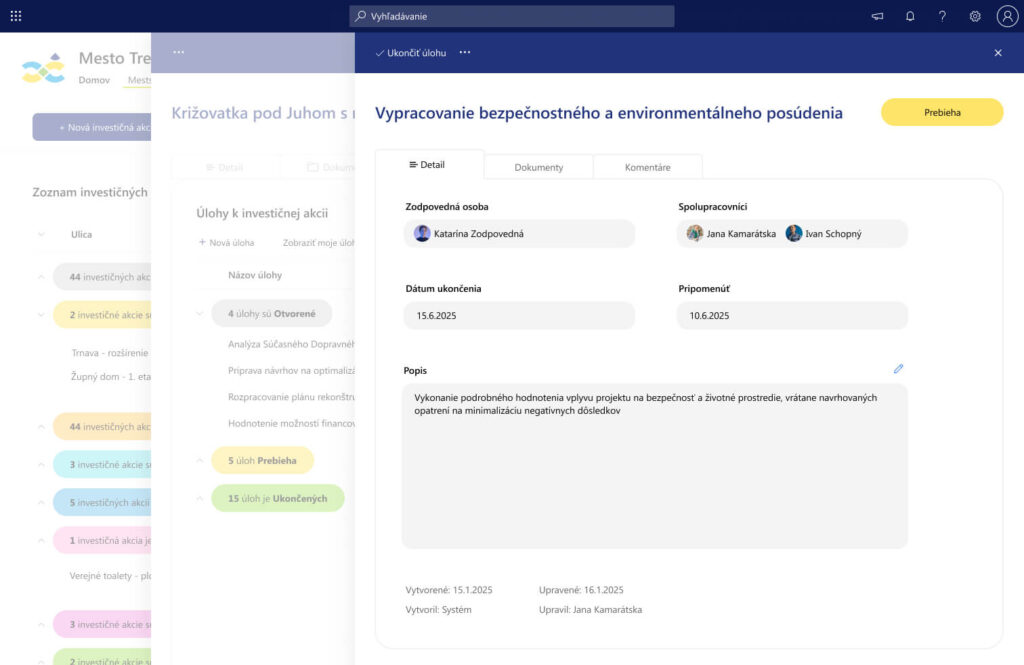
Investment Stock Module– evidence of phase, status, budget, deadlines, and documentation
Automated Document Management– the system itself creates the document structure for each action
City Task Management– clear task tracking across all employees
Overview of Departments and their Employees– internal organizational structure, simple and understandable
Technologies the city already has—just put to better use
The solution's foundation is Microsoft 365 and SharePoint. The city of Trnava was already using this platform, but it lacked structure and integration with the city's processes. Therefore, within the project, we also providedTechnology consultingand recommendations on how to set up and customize the M365 environment so that city employees can benefit from it to the fullest.
How does the system rate the city?
What was the main reason for implementing the new system?
The investment stock management system replaces the local records of city workers who plan, manage, and control investment construction projects. This step was necessary to simplify the management and coordination of these projects.
What benefits does the new system bring to employees?
The solution allows for the sharing of documents and information across the entire organizational structure of the office. Transparency regarding the status of investment actions has also improved, and project approval and control processes have been accelerated. Furthermore, task management within the system contributes to a more efficient division of labor.
What technologies and tools did you choose for your new system, and why?
The implemented system is built on the SharePoint platform, which is already well-known to users. This ensures that working with the system is intuitive and does not require long and time-consuming employee training.
How do employees who use the system rate it?
Employees appreciate the system's simplicity and clarity, which allows them faster access to necessary information and tasks. The system has significantly simplified daily work, as everything is now centralized and accessible in one place.
– Radoslav Drobný –
Report for Trnava Smart City
Trnava showed that digitalization doesn't have to take years.
This project is proof that even municipal self-government can be fast, efficient, and ready for modern solutions. Everything depends on the approach, trust, and cooperation. The best proof is also the positive feedback from the city, which you could read about.
Share post
Article content
Do you know where exactly you're wasting time and money?
Launch our NONSENSE SCANNER. In 3 minutes, you'll find out how much precious time and money you're actually burning on unnecessary operations.
We use technologies such as cookies to store and/or access device information to provide the best experience. Consenting to these technologies will allow us to process data such as browsing behavior or unique IDs on this site. Not consenting or withdrawing consent may adversely affect certain features and functions.
Functional
Always active
Technical storage or access is necessary for the legitimate purpose of enabling the use of a specific service explicitly requested by the subscriber or user, or solely for the purpose of transmitting a communication over an electronic communication network.
Preferences
The technical storage or access is necessary for the legitimate purpose of storing preferences that are not requested by the subscriber or user.
Statistics
Technical storage or access that is used exclusively for statistical purposes.A technical storage or access that is used exclusively for anonymous statistical purposes. Without a subpoena, voluntary compliance by your Internet Service Provider, or additional records from a third party, information stored or retrieved solely for this purpose can usually not be used to identify you.
Marketing
Technical storage or access is necessary to create user profiles for ad serving or user tracking on a website or across multiple websites for similar marketing purposes.