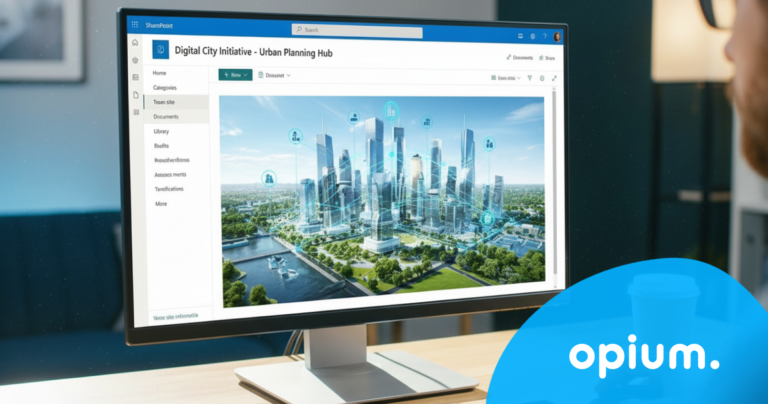
New Copilot Features in SharePoint: Tips, Tricks, and Practical Real-World Scenarios
July 7, 2026
9 minutes
Readings
If you've been following AI developments for a longer time, just like us, and you're aware of Copilot, then in our previous article we looked at how it can work as an everyday helper for content work. However, things have moved on since then, and not just a little Wow function, but about a number of practical improvements that are becoming noticeable, especially on regular workdays. We will introduce you to 5 useful features that are game changers in everyday working life.
In other words: Copilot is no longer just an assistant you call on occasionally. It's becoming like your ideal colleague, sitting next to you, never interrupting, and most importantly, remembering everything.
1. Creating SharePoint pages without clicking
Let's start with something that marketing, HR, or internal teams are very familiar with: publishing an article on the intranet. You have a clear idea, but you just don't feel like dealing with the entire process, and honestly, you don't have the time.
Up until now, it looked like this: you open SharePoint, choose a template, deal with sections, think about headings, write text, move blocks, adjust the layout... and after an hour or two, you finally publish.
With Copilot it starts completely differently. You write to it: „Prepare an internal article about new employee benefits.“And in a moment you have before you a proposal that already has structure, logic, and usable content. You will then only adjust details such as communication tone, phrasing, or add specific information.
In practice, this means that a team that needs to quickly communicate a change is done in a few dozen minutes, not hours. Not because Copilot did everything for them, but becauseYou removed the slowest part and the mechanics around it.The result is less time spent clicking and more time dedicated to what you really want to say.
2. SharePoint Lists as a Source of Answers, Not Just a Document Repository
Lists in SharePoint have always been somewhat of a double-edged sword. On one hand, everything was nicely stored, structured, and clear. But on the other hand, if you needed to find something specific from them, the classic click-through adventure would begin. Filtering, sorting, combining conditions, and silently hoping you hadn't forgotten anything. Because that one extra filter could completely change the entire result.
Copilot, however, is changing this and begins to perceive these lists as a full-fledged source of answers, not just as a data document. So instead of going the classic route: click, filter, date, owner... try it differently – which projects are late and what is the reason? And the answer will come directly, without having to play the analyst.
In practice, it looks very simple. Imagine a Monday stand-up meeting where the manager has a few minutes before the call. Previously, they would open a list, quickly filter, check if everything adds up... and kind of hope no one would ask them something outside of what they had just managed to prepare. However, today they can ask Copilot and get a quick overview and get straight to the point. No stress, no improvisation.
And the biggest difference? Less time spent on preparation and more time dedicated to solutions. And most importantly, finally fewer moments when a few minutes before a meeting you're saying to yourself, „I'll manage somehow“...while you're digging through the list, hoping no one catches you off guard.
Less information chaos thanks to reliable sources
Every company has that moment when they look at a document and ask themselves – is this really current? Or is it something that's been lurking around since 2020? The answer is often along the lines of: "It's probably current, but I'll ask Janka just to be sure.".
While Copilot could find information before, it ran into the exact same issue you and your colleagues did: data chaos. Multiple versions, old documents, similar names… and the result was sometimes more luck than certainty. This is where a very practical change comes in. The ability to mark trusted sources from which Copilot primarily draws.
Imagine an employee asking about the vacation approval process. Previously, Copilot might have pulled up an old document that looked relevant but was outdated. Now, it relies on the current HR policy, meaning what the company actually uses. On the surface, it's a detail. In practice, however, it's a very noticeable change. Suddenly, that constant "better double-check with a colleague" is eliminated.
Fewer mistakes, fewer misunderstandings = more certainty that what you're doing is correct. The feeling that the company operates on the "we'll get it done somehow, hopefully it'll be okay" principle is gradually disappearing. Instead, you're starting to be content with clear Copilot rules that it respects.
4. Effortlessly connect information across documents
A big shift has also occurred in how Copilot works with information across the entire company. Until now, it was often about one document, one library, one source. And everything else was up to you – 7 open tabs, three document versions, one Teams chat with a colleague, and just connecting, searching, and combining.
Copilot can suddenly work with multiple sources at once and assemble them into a cohesive view.
Imagine a salesperson preparing a proposal for a client. Until now, they would have:
looking for old offers
checked reports
you mentioned that something similar was done before
called a colleague, what he remembers
Today, a context is given and Copilot: goes through existing materials, extracts relevant parts, considers past project experiences, and prepares a draft that already makes sense. Suddenly, you're not starting from a blank page, but from company know-how.
From a day-to-day perspective, this means less searching, less switching between documents And most importantly, less of that feeling that you have to figure everything out yourself. If you've ever missed that colleague who knows everything because they've been working here for 10 years, this is the moment when you start to get them. Only without having to chase them around the workplace or by phone.
5. SharePoint as a place where content originates (and doesn't disappear)
This change might be the least visible on the first click, but you'll feel it even more in your daily work. SharePoint is gradually ceasing to act as an archive where something is stored and (perhaps) someone will return to it once. It's starting to function as a place where things are actually created.
Up until now, it looked pretty classic. You need to create an offer, a report, or an internal document. What do you do? You open an old file, click „Save as,“ start overwriting titles, dates, client names... and all the while, you're careful not to leave any old data that no one will notice... until it's too late. It's a routine everyone knows. And at the same time, it's the type of work no one likes.
With Copilot, this model begins to change. Instead of copying old documents and manually editing them, you enter prompts with basic information and context. Voila, a new document is created for you. But not entirely from scratch, as it builds on what already exists in the company, on the standards you have set.
And this is precisely where the biggest change is happening. Not in the fact that it's going faster, but in the fact that redundant work is eliminated, which you were doing over and over. The result is less copying, less correcting, less checking if you forgot something. And more time for decision-making, adjustments, and thinking about whether it makes sense.
Conclusion: Small changes that fundamentally alter daily work
When we look at these new features together, it's not about one fundamental feature that changes everything overnight. It's about something much more practical. It's about a gradual change in the way you work. Because Copilot doesn't do the big things, it does the small, annoying things for you.
It eliminates moments we haven't even noticed for years, but that hindered us every day: searching for the right document, sifting through data, copying old files, uncertainty about whether we're working with the current version.
Only when these things disappear will you realize how much time and energy they were really taking from you. SharePoint it is gradually changing. It's no longer just a place where you store something and might find it someday. It's starting to function as an active assistant that can answer, help, prepare a basis, or even create content directly.
Would you like to see how these scenarios work in practice and how to use them in your company? We invite you to our webinar, where we will show you specific tips and tricks, as well as real case studies. More information or registration can be found your.
Share post
Article content
Do you know where exactly you're wasting time and money?
Launch our NONSENSE SCANNER. In 3 minutes, you'll find out how much precious time and money you're actually burning on unnecessary operations.
We use technologies such as cookies to store and/or access device information to provide the best experience. Consenting to these technologies will allow us to process data such as browsing behavior or unique IDs on this site. Not consenting or withdrawing consent may adversely affect certain features and functions.
Functional
Always active
Technical storage or access is necessary for the legitimate purpose of enabling the use of a specific service explicitly requested by the subscriber or user, or solely for the purpose of transmitting a communication over an electronic communication network.
Preferences
The technical storage or access is necessary for the legitimate purpose of storing preferences that are not requested by the subscriber or user.
Statistics
Technical storage or access that is used exclusively for statistical purposes.A technical storage or access that is used exclusively for anonymous statistical purposes. Without a subpoena, voluntary compliance by your Internet Service Provider, or additional records from a third party, information stored or retrieved solely for this purpose can usually not be used to identify you.
Marketing
Technical storage or access is necessary to create user profiles for ad serving or user tracking on a website or across multiple websites for similar marketing purposes.