Summer Mode: How to Keep Your Business Running When Half the Team Is on Vacation
August 7, 2026
8 minutes
Readings
It's Wednesday, three o'clock in the afternoon, and it's 33 degrees outside. There are three people in the office and one air conditioner that has given up. An email arrives from a client: they need a confirmation that only Janka can issue. Janka is currently on vacation and, understandably, doesn't feel like answering her phone. And suddenly you're trying to figure out whether it's polite to text a colleague on vacation, or if you should leave the client waiting until September.
Do you know that feeling? Most companies do. Summer isn't a break, after all. Summer is a test. And it reveals precisely what you managed to elegantly hide throughout the year.
Why does summer reveal what you hide during the year?
For a year, the company has been operating on the tacit agreement that „Someone knows how to do it„Where the latest version of the contract is, a colleague knows. How an order is approved, the manager knows. Who has access to the system, that one person from IT knows. It works because those people sit at the desk next to you. However, in the summer, no one is sitting at the desk. And that silent agreement completely falls apart.
It is not just a feeling. Summer can also be seen in hard numbers. In July 2023, industrial production in Slovakia fell by 5.3 percent year-on-year, with part of this decline being related precisely to the mass taking of vacations in large plants (Statistical Office of the Slovak RepublicIn production, it can be planned; the entire plant stops and everyone knows it. In the office, no one can plan it. The company keeps running, just at half capacity and with double the chaos.
The good news is that it is not about the number of people. It is about where you store your information. And that can be changed.
Who actually knows who is where and when?
Try opening the overview right now, immediately, to find out who from the team is on vacation next week and who is covering for them. If that took you more than a minute, you have your first problem.
Most companies deal with this using Outlook. But Outlook will at most show you a colleague's status „busy„, which in practice means nothing. Is he on vacation? In a meeting? At lunch? To find out who is actually missing and when, you would have to gradually open everyone's calendars, and you won't be able to manage that clearly (if you do, we'd love a screenshot). How to turn your company calendar into a place where you can see who is where in three clicks, we wrote separately inthis article.
That it makes sense is also shown by practice. At Marius Pedersen, we implemented a vacation and sick leave overview so that today they resolve about 35 recurring inquiries a month completely without emails and phone calls. No one has to ask anyone else who is where. The information is simply visible. You can find the details in Marius Pedersen case study.
What happens when the only person who „knows how“ leaves?
This is the most expensive sentence in the company: „That was only Peter.Throughout the year, Peter is a safeguard. In the summer, Peter is the single point of failure.
When all of a company's knowledge is stored in one person's head, a piece of operations leaves with their vacation. The order documents are in their email. The procedure is in their head. They know the login credentials by heart. And you have no way to access them until they return tanned and rested in three weeks.
The solution is not to lock Peter in an office. The solution is to get what Peter knows into one place where his colleague can also reach it. One central space where documents, procedures, and decisions live, instead of fifteen folders and one overcrowded email. Why such a single source of truth can save a company not only through the summer is discussed in this article.
How to prepare your business for summer in a few days, not months?
Now we hear the objection: „That is all well and good, but we do not have half a year to launch some kind of digitalization, after all, summer is already here..Fair objection. That is why we are not talking about a six-month project. We are talking about a few days of order.
To give you an idea, in one company we created a modern dashboard that replaced the traditional Excel, and we deployed it in about 2 weeks. And that was an organization with strict requirements. In the company, the basic summer schedule can be done even faster.
None of that is rocket science. It's just the difference between a company that freezes over the summer and one that doesn't even notice.
What to automate so summer runs even without you?
Part of the summer workload consists of things that a human doesn't have to do. Vacation approval. A reminder that the deadline is approaching. An application that needs to reach the right person. An answer to a question someone is asking for the tenth time.
These are the exact tasks for automation. When approvals and notifications happen automatically, it doesn't matter whether the approver is in the office or by the sea. The process keeps running. How automating routine saves companies both time and money is detailed inthis article. And if you want to go a step further, part of the frequently asked questions can now be handled even by corporate AI agent, of course set up to reach only what it is supposed to.
What digitalization won't solve over the summer?
Let's be fair, because promising miracles is also nonsense. Order in availability and documents will not replace judgment. When a non-standard situation arises, a client with an exception, or a decision that no one foresaw, the system will not make it for you. You will still need a person who knows how to weigh and decide.
It is equally true that one summer will not erase years of chaos. If you throw documents into your email all year round, you certainly won't make sense of it three days before your vacation. And a system that you set up once also needs to be maintained, otherwise the original mess will return within a year.
That is why it makes sense to start small and with one thing. First, an availability overview. Then documents. Then automation. Not everything at once, but finally something.
Summary
Summer will show you the truth about your business. If it freezes every time half the team is away, the problem is not with vacations. The problem is that the company runs on whoever happens to be sitting at the desk, not on what is written down and accessible. That can be changed, and not in half a year, but in a few days of focused order.
If you want to find out how much time is being eaten up today by gathering information and daily operations that could run on their own, try our Nonsense Scanner. In a few minutes, you'll see where your company is actually wasting time. And you might find that you can handle next summer with half the team on the beach.
Frequently Asked Questions
How to ensure coverage during vacations?
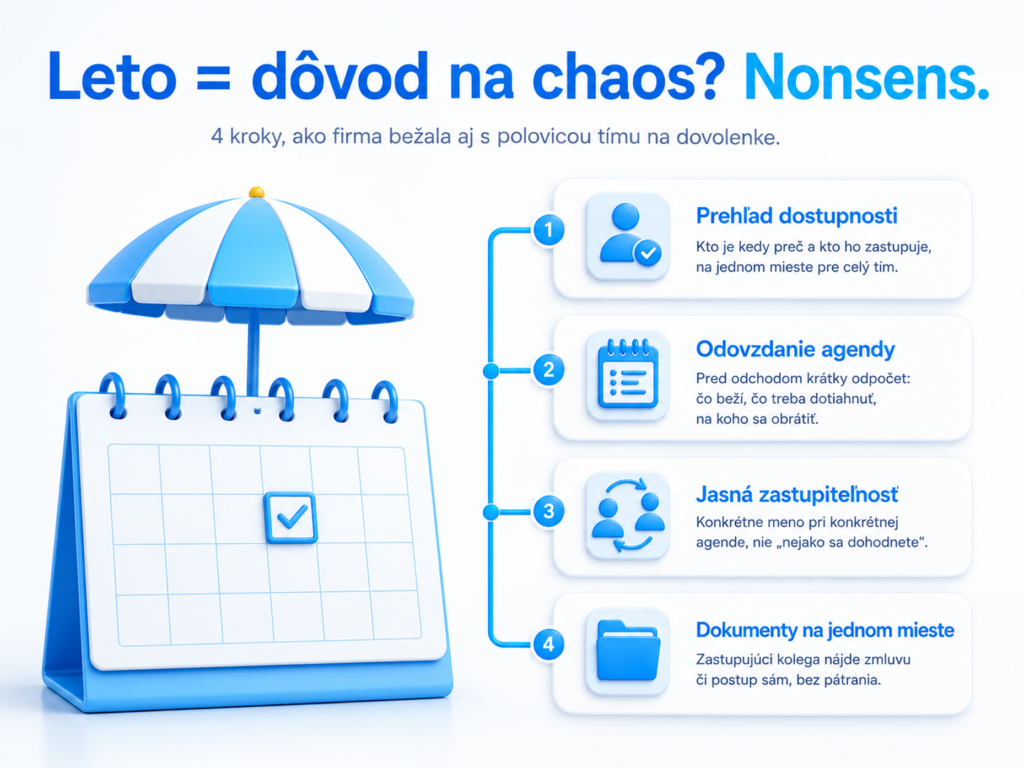
Coverage relies on three things: an overview of who is away and when, a clear assignment of who covers whom, and ensuring the substituting colleague has easy access to documents and procedures. When this is recorded and available in one place, the absence of a single team member does not mean a company outage.
How to keep track of who is on vacation when?
Outlook alone is usually not enough, it only shows the status „busy“without context. It is clearer to have one place where the entire team can see vacations, sick leaves, and coverage all at once. Based on that, the system then allows adding a vacation.
Can a company be prepared for the holiday season quickly?
Yes. It is not a six-month project, but a few days of getting things in order: an availability overview, handover of tasks, clear delegation, and documents in one place.
What is worth automating before the summer?
The most helpful thing is to automate routine tasks that otherwise wait for a specific person: vacation approvals, deadline reminders, routing requests to the right person, and answering repetitive questions. When these steps run on their own, it does not matter whether the approver is at work or on vacation.
Is it worth it even for a small business?
Yes, in a small company, the dependency on a single person is often even greater than in a large one, because a single employee handles multiple tasks at once. That is precisely why it pays off even for a small company to have availability and knowledge in one place rather than exclusively in people's heads.
Share post
Article content
Do you know where exactly you're wasting time and money?
Launch our NONSENSE SCANNER. In 3 minutes, you'll find out how much precious time and money you're actually burning on unnecessary operations.
We use technologies such as cookies to store and/or access device information to provide the best experience. Consenting to these technologies will allow us to process data such as browsing behavior or unique IDs on this site. Not consenting or withdrawing consent may adversely affect certain features and functions.
Functional
Always active
Technical storage or access is necessary for the legitimate purpose of enabling the use of a specific service explicitly requested by the subscriber or user, or solely for the purpose of transmitting a communication over an electronic communication network.
Preferences
The technical storage or access is necessary for the legitimate purpose of storing preferences that are not requested by the subscriber or user.
Statistics
Technical storage or access that is used exclusively for statistical purposes.A technical storage or access that is used exclusively for anonymous statistical purposes. Without a subpoena, voluntary compliance by your Internet Service Provider, or additional records from a third party, information stored or retrieved solely for this purpose can usually not be used to identify you.
Marketing
Technical storage or access is necessary to create user profiles for ad serving or user tracking on a website or across multiple websites for similar marketing purposes.