AI Agent Security - How Not to Let Your Copilot Sniff Out Your Secrets
July 7, 2026
5 minutes
Readings
AI agents are like Swiss Army knives in the digital world. They can read, write, connect data, send notifications, automate workflows... and if you set them up correctly, they won't even forget your boss's birthday.
But in the wrong hands, or without control? They can accidentally reveal sensitive information, alter the wrong record, or trigger a process that wasn't supposed to go live yet..Their deployment can be either a win or a ticking time bomb.
Let's look together at where AI agents make sense and where, on the other hand, you should stay away from them.
What you need to know before letting them into your system?
Imagine an AI agent as a colleague who is technically proficient, reliable, and has a large capacity. It all sounds great, but if this colleague is not handled properly, they can do more harm than good.
The agent is not a simple chatbot
Unlike regular chatbots, which help you find answers to questions about where to find things, an AI agent goes further. Not only does he answer, but he also acts. It creates records, changes statuses, has access to documents, and can send emails. That's why it needs clearly defined permissions.
Access rights are fundamental
If an agent is like your internal colleague (just without emotions), it should have the same or even limited rights. Access to data should not be password-protected. “Let's give him everything so we can have peace.”. Setting up permissions is a basic thing you should have a handle on, not just read about.
Can your agent see documents about HR changes? – they shouldn't, there's usually too much sensitive data.
Does the agent have the ability to write data? – Only if necessary and under supervision.
Should Agents read your Teams messages? – should they, really?
TipIf you wouldn't approve access for a junior intern, don't approve it for an AI agent either.
Auditability and records
Every single step of the agent should be: recorded, traceable, and auditable. If you cannot answer the question “What exactly did the AI agent do today?” You have a problem, not control. For example, imagine that an agent decides to help and starts closing incorrect tasks that have not yet been resolved, based on a private conversation.
Where do AI agents make sense?
Repetitive tasks that nobody wants to do Typically: rekeying data between systems, sorting requests, project status notifications.
Business assistance Agents in SharePoint or Teams help find the right document, summarize meetings, or generate responses in ticketing systems.
Data analysis for management The agent will pre-select data, flag anomalies, and prepare documentation for decision-making (e.g., that department X is exceeding its budget - even before the Excel guru catches it).
Where should AI agents' hands be kept away from?
Decisions with a legal or ethical dimension The agent doesn't know what constitutes a fair dismissal or a fair distribution of bonuses. A human still has to intervene here.
Environments with sensitive data without protection Sometimes, one mistake is all it takes to have an incident on your hands. No logs, no traces.
Situations where the context changes rapidly Agents don't read between the lines. If they don't know that “the plan changed after yesterday's meeting,” they might continue with the old scenario. And that's not good.
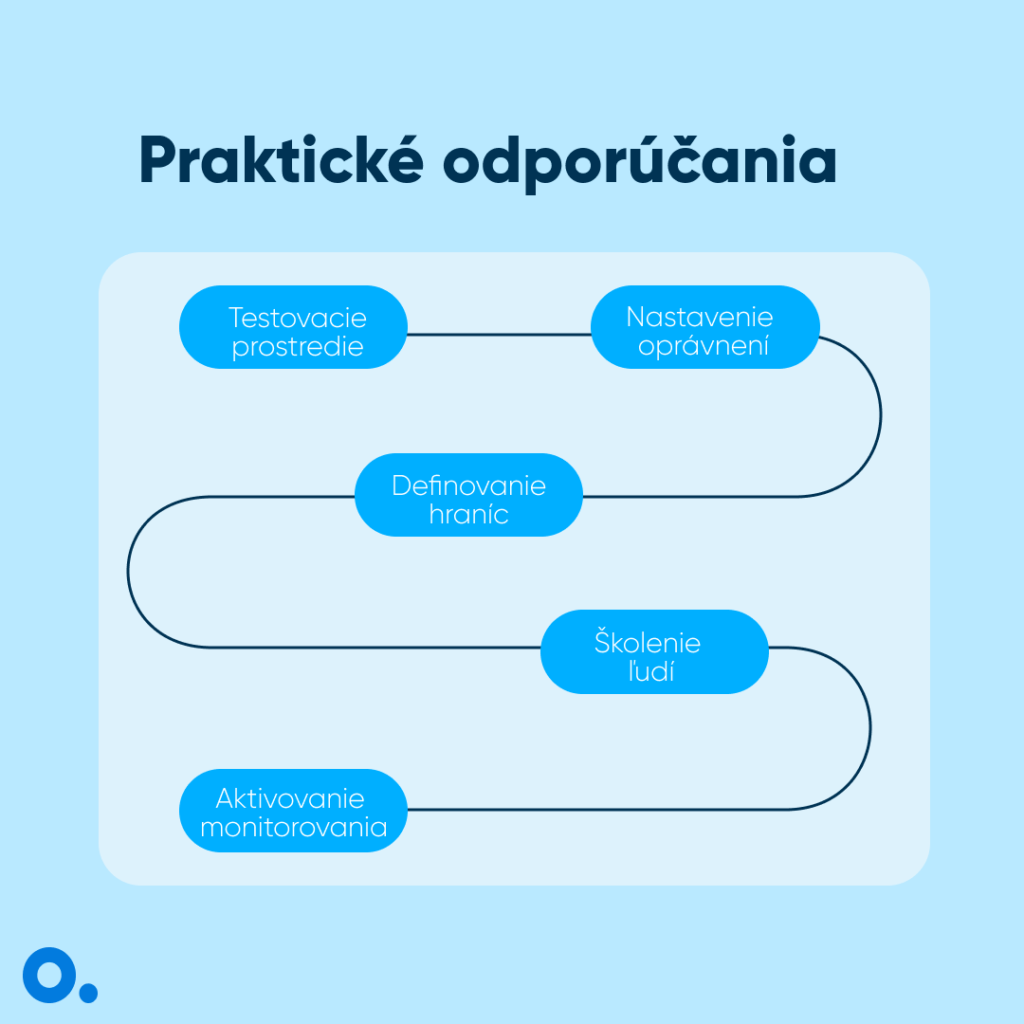
Practical recommendations
Let's look at how to set up AI agents safely and smartly.
Start in test environment – You don't want him to delete your entire database, do you.
Set minimum required permissions The less he sees, the less he spoils.
Define him border AI agents lack intuition and need clear rules for what they can and cannot do.
Activate Logging and monitoring – without records you have no recourse
Train the people how to communicate with an agent - wrong question = wrong answer
Grasp the AI agent correctly
Poorly configured AI agents can truly ruin your day, as well as time-consuming work. Just one wrongly set request or poorly configured approach and you've got a disaster on your hands. Proper deployment is key. If you put in the effort and set clear boundaries, it will pay off. It speeds up work, reduces costs, and improves company efficiency.
However, it is important to know what the agent can and cannot do. It is not a tool that you give everything to and hope it will manage. It's important to maintain control over it. You definitely shouldn't give him free access to sensitive information when he doesn't understand it.
Let the agent stay where it belongs: in the position of a quick helper, not an independent member.Helpful, safe, and reliable. Above all, under control.
Share post
Article content
Do you know where exactly you're wasting time and money?
Launch our NONSENSE SCANNER. In 3 minutes, you'll find out how much precious time and money you're actually burning on unnecessary operations.
We use technologies such as cookies to store and/or access device information to provide the best experience. Consenting to these technologies will allow us to process data such as browsing behavior or unique IDs on this site. Not consenting or withdrawing consent may adversely affect certain features and functions.
Functional
Always active
Technical storage or access is necessary for the legitimate purpose of enabling the use of a specific service explicitly requested by the subscriber or user, or solely for the purpose of transmitting a communication over an electronic communication network.
Preferences
The technical storage or access is necessary for the legitimate purpose of storing preferences that are not requested by the subscriber or user.
Statistics
Technical storage or access that is used exclusively for statistical purposes.A technical storage or access that is used exclusively for anonymous statistical purposes. Without a subpoena, voluntary compliance by your Internet Service Provider, or additional records from a third party, information stored or retrieved solely for this purpose can usually not be used to identify you.
Marketing
Technical storage or access is necessary to create user profiles for ad serving or user tracking on a website or across multiple websites for similar marketing purposes.