How to set up a company calendar so it actually works?
May 20, 2026
3 minutes
Readings
Imagine your company calendar as one large room full of sticky notes. One has a vacation on it, another a sick day, and another a business trip or work-from-home. Outlook just shows you as busy or „Busy“But what does that actually mean?
In reality, however, no one knows who and where they actually are, or whether they are working or not. Planning turns into guesswork, where only questions are added, but without clear answers.
If you want to get rid of the lengthy search for colleagues, Sync your calendar with SharePoint.
The Outlook calendar works great if you're scheduling meetings for yourself. However, if the calendar is to serve the entire company, complications will start to arise.
Share with each user individually – instead of central calendar access, permissions need to be set for each user individually, one by one.
No event types – Outlook does not distinguish between holidays, business trips, or doctor's appointments.
Copilot/AIwithout use– if the calendar only shows „Busy“Copilot cannot read anything more.
You cannot directly insert an edited calendar into the intranet or Teams.
If you're looking for oversight, automation, and collaboration, you need something more.
SharePoint & Calendar
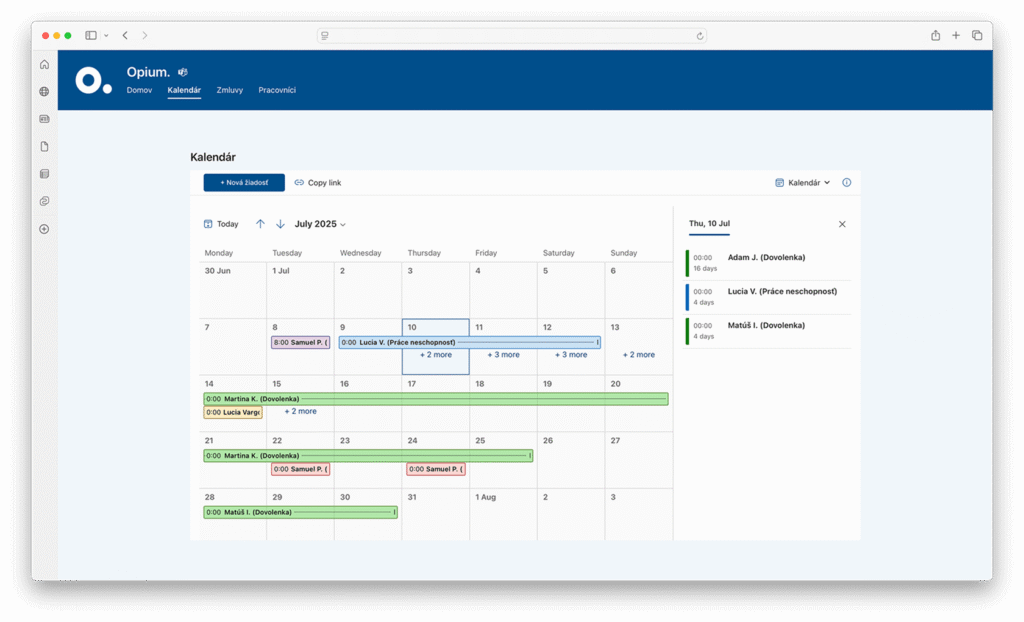
SharePoint has extra features that regular calendars don't offer. It shows more than someone is “Busy”You can easily see how long someone has been at a location. It will organize the entire team with ease.
What's so great about the SharePoint calendar?
Central Administration Creation of multiple calendars in one place. HR, management, or service – each has its own content, but thanks to the overlay display, it's possible to track them with an overview simultaneously.
Metadata, approvals, and versions The calendar is a smart list – a SharePoint list. It allows custom fields (event type), automatic approvals, and change history.
Sync with Outlook The calendar is easy to link to Outlook. Anything updated in SharePoint will also automatically sync to Outlook.
Dashboards, filters, colors – with ease It is possible to filter event types, teams, or distinguish events by color.
Access rights Team, department, and management level permissions. No one will see more than they should. Secure and transparent permission settings.
Conclusion
If you need order in vacations, sick days, and business trips, Outlook can't handle it. Not as the main platform. Outlook is suitable for personal calendars and tasks, but for a company calendar, a system is suitable.
SharePoint can handle these requirements with ease. Unified views, quick approvals, and secure accessto authorized persons. It's not just about records and attendance, but about a system that Saves time, minimizes errors and makes from automatic planning process instead of detective work.
Such a solution will offer you all information in one place – without clicks, duplicates, or chaos. We showed the SharePoint calendar in more detail on our webinar.
Share post
Article content
Do you know where exactly you're wasting time and money?
Launch our NONSENSE SCANNER. In 3 minutes, you'll find out how much precious time and money you're actually burning on unnecessary operations.
We use technologies such as cookies to store and/or access device information to provide the best experience. Consenting to these technologies will allow us to process data such as browsing behavior or unique IDs on this site. Not consenting or withdrawing consent may adversely affect certain features and functions.
Functional
Always active
Technical storage or access is necessary for the legitimate purpose of enabling the use of a specific service explicitly requested by the subscriber or user, or solely for the purpose of transmitting a communication over an electronic communication network.
Preferences
The technical storage or access is necessary for the legitimate purpose of storing preferences that are not requested by the subscriber or user.
Statistics
Technical storage or access that is used exclusively for statistical purposes.A technical storage or access that is used exclusively for anonymous statistical purposes. Without a subpoena, voluntary compliance by your Internet Service Provider, or additional records from a third party, information stored or retrieved solely for this purpose can usually not be used to identify you.
Marketing
Technical storage or access is necessary to create user profiles for ad serving or user tracking on a website or across multiple websites for similar marketing purposes.