Automation doesn't have to be expensive. All you need is an AI agent in Copilot, our guide, and some skills.
November 5, 2026
8 minutes
Readings
Every Friday the same thing. Someone collects numbers from at least three spreadsheets, adds notes from meetings and compiles a report for management. The solution offered is self-evident – let’s buy a dashboard. Do you need an expensive dashboard to automate routine tasks? Nonsense.
If you use Microsoft 365, you can build your own AI agent in Copilot. No programming required and with basic settings at no additional cost. And you can download ready-made skills to start using them today.
What is an AI agent?
An AI agent is an assistant to whom Once you explain what kind of work he has to do and how. They get a name, a description, instructions, and possibly resources from which they can draw. Then you just open it and give it the documentation. You don't have to write a long prompt every time; the agent remembers how it's done here. What all AI agents can do in a company in large numbers was discussed in the article AI agents in companies: when software works for you. Today we’re going about it practically and in a small way. A regular chat is a skilled worker who needs to be explained everything all over again. The agent is a busy colleague, who knows what your report should look like, what tone you should use when writing to a customer, and what does not belong in the note.
Why not start with expensive dashboards?
Dashboards have their place when a company tracks dozens of indicators across the X system. But most of everyday routine isn’t about graphs. It’s about someone having to take notes, spreadsheets, and emails. assemble the textReport, minutes, customer response. The dashboard shows you the numbers. The report won’t write it for you. And by the time the dashboard is purchased and installed, it will take weeks, if not months. You have a simple agent ready in one afternoon.
First, automate what you do manually every week. Only then can you figure out what would be nice to see in the graph. You often find that the expensive dashboard you actually didn't need. You needed someone to compile the Friday report for you.
How much does an AI agent cost in Copilot?
Let's be precise, because „for free“ It always has an asterisk. Copilot Chat is available for Microsoft 365 corporate accounts. According to Microsoft, they are agents who work only with instructions and the public website, free of charge. Payment only starts when an agent extracts data from the company, for example from SharePoint. Why is working with company data different from working in a regular chat?, we explain in our comparison. For a routine of the type „Here are the notes; make a report from them“ Often a free level is enough; you simply upload the documentation into the chat. The agent doesn't need to see your entire SharePoint to create a readable report from five snippets. And once you're ready to go further, see what Copilot can do directly in SharePoint.
How to create an AI agent – a guide?
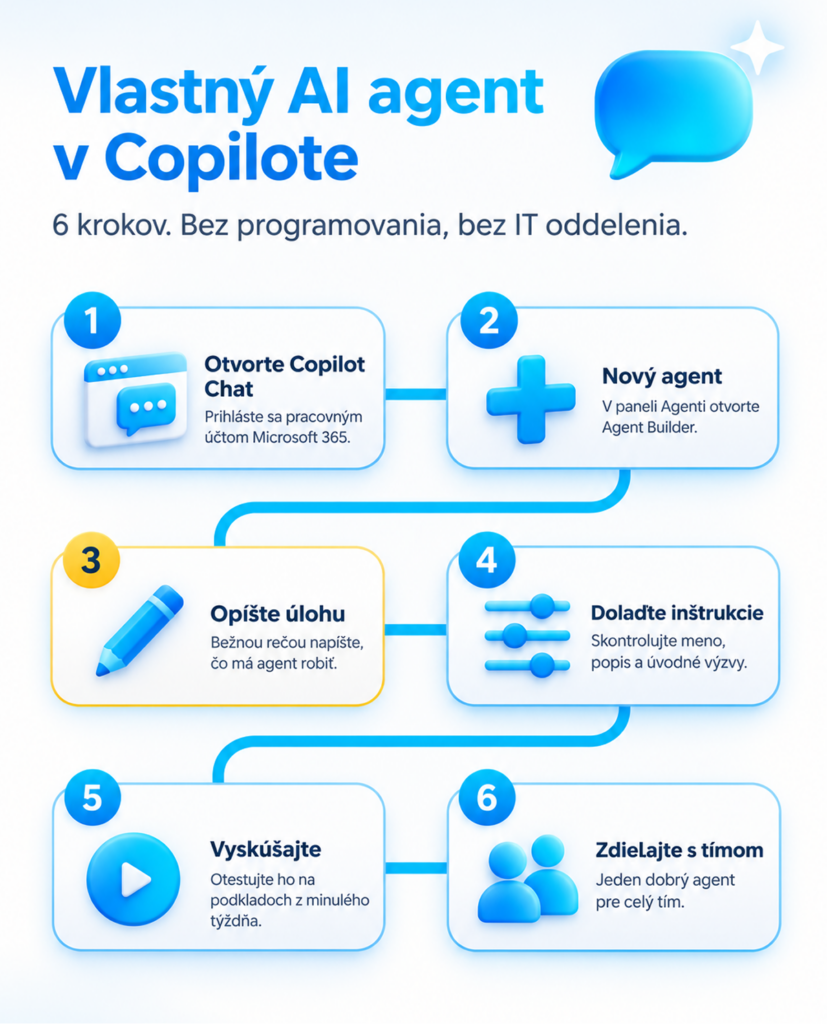
You can manage the entire setup without the IT department and without a single line of code. All you need to do is follow a simple procedure:
Open the Copilot Chat. In the browser on m365.cloud.microsoft or in the Microsoft 365 Copilot app, logged in with a work account.
Create a new agent. In the left panel, select Agents and then New Agent. The Agent Builder will open.
Describe what they have to do. For example: „Every Friday, you will make a weekly report for me based on the notes.“ Agent Builder will design the settings itself.
Modify the instructions. On the Configure tab, check the name, description, and instructions. Add introductory prompts so colleagues know what to write to the agent immediately.
Try it on real substrates. Give him/her notes from last week and compare the result with what you would have written yourself.
Share it with the team. One well-trained agent for the whole team is better than ten improvised prompts.
What are skills and how can you use them?
The skill is a ready-made procedure that the agent uses whenever a suitable task arises. It's a .zip package with the SKILL.md file. The result always looks the same, no matter who asks. We have prepared these for you:
Weekly report: From notes, a task list, or an Excel export, he prepares a report for management. A summary in three bullet points: what is done, what costs, risks, and a plan. He doesn’t make up the numbers; he marks what is missing.
Minutes of the meeting: From the notes, he will make a record of decisions and a task list (who, by when). He will mark tasks without a responsible person so that they are not lost.
Are you interested in skills? Write to us atahoj@opiumsystems.skand we will be happy to send them to you immediately. You simply add the skill in Agent Builder under the Configure tab in the Skills section. You can upload the whole .zip file or just copy the contents of SKILL.md into the agent instructions. It works just as well and you can customize the skills to your liking., For example, add your own sections to the report or a corporate format to the minutes.
How does it look in practice?
Several model situations where the agent earns money for himself in the first week:
Team leader on Friday. He puts a list of tasks and notes from the week into the agent's inbox. In a minute, he has a report that he just reads and sends out.
Project manager after consultation. He/She inserts the notes and the agent returns the task sheet. He/She sends it to Teams before lunch.
Office manager. He has his colleagues write the answers to the same questions consistently according to the instructions of the agent. No copying from old emails.
Local government. The reference will make a clear summary of the meeting for colleagues from other departments.
What does the AI agent not solve?
Let's be fair, because promising miracles is also nonsense. An agent is not a system. It does not store data, it does not start the process itself, and at the free level it does not see your emails or SharePoint. The output needs to be checked; AI can make mistakes just as confidently as a human. The person who sends the report to management still remains responsible for it. And when an agent is tasked with working with company documents, there is also a need for proper authorization, which you can learn more about in our article on Security of AI agents. The agent expedited the work that you can describe. Chaos will not describe it for you.
Do you want to talk about AI live?
The instruction is one thing; talking with people who are dealing with the same thing is another. That is why we invite you to Opium. AI Brunch, which will be November 19, 2026 from 9:00 to 11:00 at Opium. Cowork & Coffee in Trnava. We’ll talk about the role of leadership in implementing AI, show specific AI skills for everyday work in Microsoft 365 and Copilote, and advise how to set up rules to save time safely with AI. There will also be a full-fledged brunch and good coffee. The number of seats is limited, and we confirm each registration in person, so please register as soon as possible. Apply in time.
You were intrigued by it?
If you want an agent who works with your documents in SharePoint as well, Do not hesitate to book an appointment with us. We will go through your routine together and show you where the agent can save you the most time.
Yes, if it only works with instructions and the public web. Agents connected to corporate data are paid via pay-as-you-go or the Microsoft 365 Copilot license. For regular text workflows, the free level often suffices.
Do I need to program to create an agent?
No. You create the agent in Agent Builder directly in Copilot Chat; you just need to describe what the agent should do in plain language and fine-tune the instructions.
What is the difference between an agent and a skill?
An agent is an assistant with a name and instructions. A skill is a pre-defined sequence of actions that the agent will use whenever a task appears. One agent can have multiple skills.
Will the agent see my emails and documents?
Not in the free level. It works with what you put into the chat, and with the public web. Access to corporate data requires a license or pay-as-you-go.
Do the skills work even without the Copilot license?
Replacing skill as a package is not possible. However, you can insert the contents of the SKILL.md file into the agent instructions and the result will be very similar.
Will it replace the agent dashboard?
No. The dashboard tracks numbers over time; the agent helps with the text routine. However, for many companies, an agent is enough for the start, and the dashboard comes into play later.
Share post
Article content
Do you know where exactly you're wasting time and money?
Launch our NONSENSE SCANNER. In 3 minutes, you'll find out how much precious time and money you're actually burning on unnecessary operations.
We use technologies such as cookies to store and/or access device information to provide the best experience. Consenting to these technologies will allow us to process data such as browsing behavior or unique IDs on this site. Not consenting or withdrawing consent may adversely affect certain features and functions.
Functional
Always active
Technical storage or access is necessary for the legitimate purpose of enabling the use of a specific service explicitly requested by the subscriber or user, or solely for the purpose of transmitting a communication over an electronic communication network.
Preferences
The technical storage or access is necessary for the legitimate purpose of storing preferences that are not requested by the subscriber or user.
Statistics
Technical storage or access that is used exclusively for statistical purposes.A technical storage or access that is used exclusively for anonymous statistical purposes. Without a subpoena, voluntary compliance by your Internet Service Provider, or additional records from a third party, information stored or retrieved solely for this purpose can usually not be used to identify you.
Marketing
Technical storage or access is necessary to create user profiles for ad serving or user tracking on a website or across multiple websites for similar marketing purposes.