Don't get bogged down by contracts – master them with SharePoint
May 20, 2026
8 minute read
In today's dynamic work environment, document management can turn into a real nightmare. When you add contracts full of legal complexities and intricate deadlines, it creates the perfect breeding ground for confusion or stress. There's a tool like SharePoint that will rid you of unnecessary worries and make contract processing a piece of cake.
If you haven't tried its potential yet, get ready for a game-changer. Microsoft SharePoint it's not just about uploading documents, but mainly about simplifying the entire process. Not only does it will do it quickly, but mostly meaningful. Companies will thus reduce costs and employee stress levels, plus increase work efficiency.
Based on studies At LAB University of Applied Sciences, we can confidently say that SharePoint is not only a great tool but also a worthwhile investment for any company. The fact that you'll enjoy its clarity and simplicity is just the cherry on top. Let's explore what SharePoint can do and why it might become your new favorite (not just) for contract management.
Templates and preset formatting – stress-free contract creation
Contract creation no longer has to be a source of stress. With pre-set templates and automatic formatting in SharePoint, you'll become a contract expert with one click. If you've ever struggled with constantly adjusting formats, aligning text, or searching for the right templates, we have only one recommendation for you – SharePoint. Well-configured templates and formatting automation can significantly simplify the document creation process.. Not only will you save a lot of time, but you'll also eliminate human errors that can occur during manual processing. So, forget about the stress of formatting and let SharePoint take care of everything.
Document versions – no worries about lost or outdated contracts
You've finally found the contract, but you still have a dilemma: is this version of the contract really the current one? What if I edit or send the wrong one? SharePoint has a simple answer for this: no worries. This clever tool automatically tracks all versions of documents. You can go back to older versions at any time, fix a typo, and you don't have to worry about anything disappearing. In short, you have all contracts under control, with minimal risk of errors.
47 % companies confirmed that updating versions in SharePoint helped them keep their contracts in order and avoid legal issues. So, no more questions like „Where is the correct version?“ The cost savings for the lawyer are no longer waiting.
Everything in one place – goodbye to chaos and disorder
If you ever feel like a detective searching for a contract among a million attachments, believe me, you're not alone. Traditional document management methods usually mean they're scattered across various systems, servers, or emails. And that only leads to one thing – chaos. Chaos = wasted time, frustration, and a ton of pointless clicks.
SharePoint enters the scene as a cleaner and organizer, putting all contracts back in their place, and if they don't have one, it creates it. You'll never have to spend hours searching for important documents again. What's best about it? Thanks to Centralization in SharePoint can save up to 30% of the time spent searching.
Access documents anywhere, anytime
Remote work is a part of our lives, and thanks to SharePoint, contracts and documents are always at hand. Fun fact: studies show that flexibility and mobility increase productivity. Simply put, the more time you spend working in a comfortable spot, the less time you'll spend dealing with the chaos of document management.
SharePoint also points out that companies that have adopted remote access solutions have increased their efficiency by 30%. So when you need to respond to customer requests or business partners, it only takes a few clicks and the process becomes fast and smooth. It doesn't matter if you're sitting in a cafe, on the beach, or waiting for a train.
Automatic reminders – forget about missed deadlines
When was the last time you forgot a contract renewal deadline or a document revision? We all know what it's like to have an missed deadline on our mind at night. With the help of SharePoint, this doesn't have to happen again. At the same time, it serves as a reminder of important dates that could otherwise become a real nightmare.
Automatic reminders They are a real lifesaver for companies – thanks to them, you no longer have to worry about missing any deadlines. SharePoint is a digital alarm clock that ensures all contract revisions and renewals are always under control within the company. Finally, everyone can breathe a sigh of relief and sleep without fear of unexpected deadlines.
Real-time approval – no delays and no watching the clock
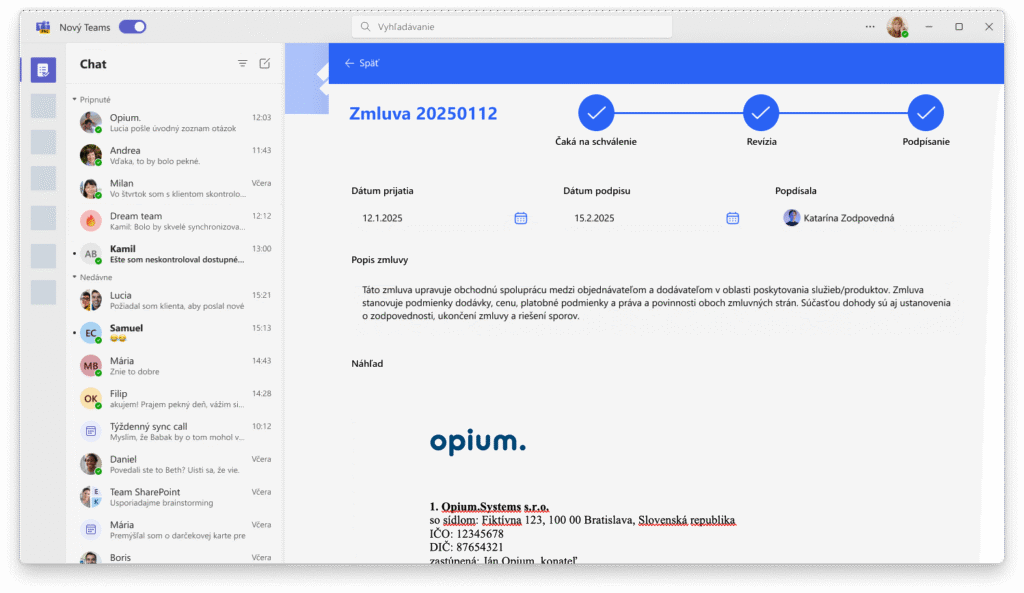
Contract approval is like a game of hide-and-seek with emails and waiting for confirmations. Let's be honest, who wouldn't want to simplify this process a bit? SharePoint can handle it with ease. It allows for real-time document approvals, thus eliminatingsending emails or finding signatures.
If you implement automated approval via SharePoint in your company, the approval process will be shortened by a whopping 40 %. This means less stress and more time for the things that really need attention. Simplifying the process will not only improve the productivity of the entire team, but will also speed up the response to changes and business opportunities.
Security like in the CIA – protecting documents and sensitive information
Who wouldn't want their documents to be as secure as top-secret CIA communications? When managing contracts, security is paramount. SharePoint uses encryption to ensure all documents are protected from unauthorized access, just like the most classified agency operations.
56 % companies consider security to be the biggest challenge in contract management, especially when it comes to sensitive data. SharePoint functions as a bouncer, encrypting data and allowing access only to authorized individuals. This minimizes the risk from both internal and external threats, so you can sleep soundly knowing your secrets are safe.
Saving time and money – effective cost management
If your company decides to invest in tools like Microsoft 365 or SharePoint, it might seem like a big and definitely significant step at first glance. Like an SBS (Small Business Server) guardian at the entrance, SharePoint stands ready to protect the company from chaos and unnecessary stress.
For companies that decided to implement SharePoint for contract management, this resulted in a reduction in administrative costs of up to 25%. These saved funds can be invested in something more productive – such as process automation, reminders, or centralization…
SharePoint and contracts – a perfect match
Contracts are more of a nightmare than productive work for many of us. Piles of paper, endless document versions, and constant recurring issues with reminders and approvals. Fortunately, with SharePoint, the entire process changes into something effective, clear, and fun. If we look at everything Microsoft SharePoint offers, we find that it is an invaluable assistant in contract management.
In conclusion, a brief summary:
All documents in a clearly centralized on in one place.
Utilization automated approvals Workflow systems.
Document encryption, access rights Are the latest versions of the documents within reach.
Thanks automatic reminders SharePoint doesn't forget any deadline.
Simplify contract management and say goodbye to chaos and disorganization. SharePoint offers you tools that not only they save time and money, but also Simplest life. So why hesitate any longer? If you want to learn even more about this topic, we recommend checking out our webinar.
Matúš Izakovič
Share post
Article content
Do you know where exactly you're wasting time and money?
Launch our NONSENSE SCANNER. In 3 minutes, you'll find out how much precious time and money you're actually burning on unnecessary operations.
We use technologies such as cookies to store and/or access device information to provide the best experience. Consenting to these technologies will allow us to process data such as browsing behavior or unique IDs on this site. Not consenting or withdrawing consent may adversely affect certain features and functions.
Functional
Always active
Technical storage or access is necessary for the legitimate purpose of enabling the use of a specific service explicitly requested by the subscriber or user, or solely for the purpose of transmitting a communication over an electronic communication network.
Preferences
The technical storage or access is necessary for the legitimate purpose of storing preferences that are not requested by the subscriber or user.
Statistics
Technical storage or access that is used exclusively for statistical purposes.A technical storage or access that is used exclusively for anonymous statistical purposes. Without a subpoena, voluntary compliance by your Internet Service Provider, or additional records from a third party, information stored or retrieved solely for this purpose can usually not be used to identify you.
Marketing
Technical storage or access is necessary to create user profiles for ad serving or user tracking on a website or across multiple websites for similar marketing purposes.